
Creating viral AI videos for Facebook is now much easier with Sora 2. In this guide, I will show the exact workflow I used to create and post my video using Sora 2, even if the model is not available in your country.
This is a beginner-friendly guide, so anyone can follow it.
Step 1: Use a VPN to Access Sora 2
Sora 2 is not available in all countries. To access it, you need to change your location to the United States.
I personally used Urban VPN, which is free and easy to use.

What to do:
- Install Urban VPN on your browser or system.
- Open the VPN and select United States as your location.
- Make sure the VPN is active before moving to the next step.
Once connected, you will be able to access Sora without any issues.
Step 2: Create or Log In to Your Sora Account
Now that your location is set to the USA, go to the official Sora website:
What to do:
- If you already have an account, simply log in.
- If not, create a new account using your email or Google login.
After logging in successfully, you will see the Sora video generation interface.
Step 3: Paste the Prompt and Generate the Video
This is the most important step.
Copy the full prompt you used for your viral video and paste it directly into Sora’s prompt box.
Do not shorten it. Do not remove details. The emotions, lighting, camera style, and dialogue are what make the video viral.
Prompt:
Style: Viral social media/home video aesthetic. Vertical composition (9:16). The lighting is soft, natural, and diffused, coming from a window with sheer curtains in the background. The image is high-fidelity and extremely cute, capturing the texture of the flour on their faces and the softness of the cat’s fur.
Prose:
In a sunlit room, a chubby toddler boy stands at a wooden table face-to-face with an orange tabby cat. The toddler is wearing a beige ribbed long-sleeve henley shirt. Both the boy and the cat are covered in white flour—it is smeared all over the boy’s nose, cheeks, and hands, and dusted heavily on the cat’s forehead and whiskers. The toddler holds the cat’s face gently but firmly between his hands, staring into its eyes with the seriousness of a mob boss debriefing his accomplice.
Cinematography:
Camera shot: Static extreme close-up, profile view, framing the faces of the toddler and the cat inches apart.
Mood: Adorable, guilty, serious.
Lighting: Soft natural daylight.
Actions:
The toddler holds the cat’s cheeks and issues a stern warning.
The cat lets out a soft meow.
The toddler immediately interrupts, wagging a flour-covered finger (“No, no more meow meow”).
The toddler asks for a “pinky promise.”
Beat: He looks down at the cat’s paw, realizes a biological limitation, and corrects himself (“Well, you don’t have a pinky”).
He accepts the verbal agreement and pets the cat’s messy head aggressively but lovingly.
Dialogue:
Toddler: “Don’t do that again, okay? You understand?”
Cat: “Meow.”
Toddler: “No. No more meow meow, okay?”
Toddler: “Pinky promise?”
Cat: “Meow.”
Toddler: “Well, you don’t have a pinky. But you promise?”
Cat: “Meow.”
Toddler: “Okay. Good cat.”
Background Sound:
Quiet room tone, the toddler’s serious whispery voice, and the cat’s soft meows.
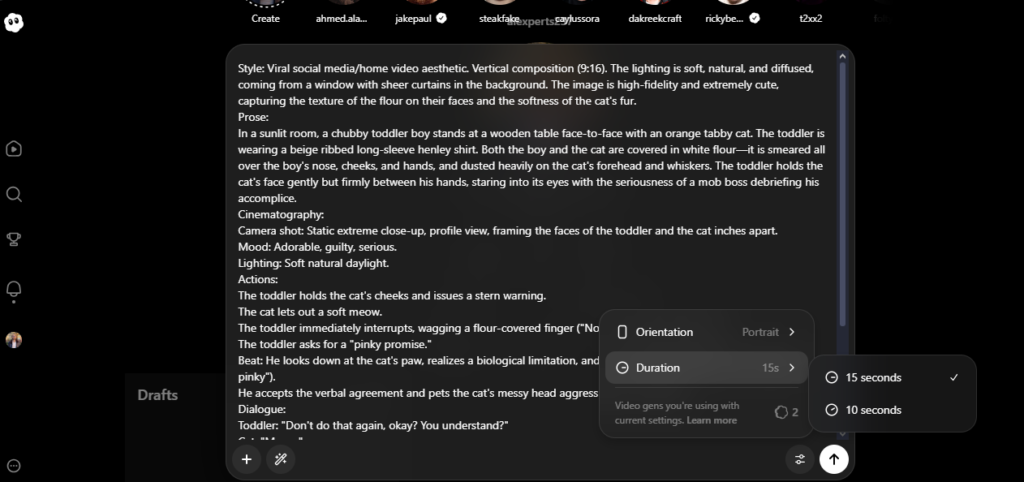
After pasting the prompt:
- Select vertical format (9:16) if required.
- Click on Generate Video.
- Wait for Sora to process and create the video.
Once done, post the video and copy the share link.
At this stage, the video will contain a watermark.
Step 4: Remove the Watermark
To remove the watermark, use this website:
Sora-video-downloader
What to do:
- Open SnapSora in your browser.
- Paste the copied link.
- Let the tool process the video.
- Download the watermark-free version.
This step is quick and does not require technical knowledge.

Step 5: Upload the Video on Social Media
Now your video is ready.
You can upload it to:
- Facebook Reels
- Instagram Reels
- TikTok
- YouTube Shorts
Make sure to:
- Write an engaging caption
- Use relevant hashtags
- Post in high quality
- Avoid re-uploading with heavy compression
This exact workflow helped me create a highly engaging and viral-style Facebook video.
Final Thoughts
Sora 2 is a powerful tool for AI video creation, especially for emotional, cute, and storytelling content.
With the help of a VPN and a simple watermark removal tool, you can easily create professional-quality videos and post them on social media.
If you focus on strong prompts and emotional storytelling, your chances of going viral increase significantly.

Thank you so much for sharing us like this, it gives us informational inspirations. I look forward for more videos you will made.
Thank you so much for this, I have had sleepless nights trying to figure this out
Please, I have some questions,
1, are this videos monetizable?
2, do I need to turn on Ai info when posting?
3, will you be posting more prompts, or will you just give a prompt style to generate other video prompts